To play GTA 6 with GTA 5’s button layout, pause the game, go to Settings and change Control Scheme from Default to Classic. Sprint goes back to X (A on Xbox) and jump goes back to Square (X on Xbox), just like GTA 5. GamesRadar+ walked through the switch, and kevinsmak and Checkmark Academy both showed the menu on a PS5.
How to switch to Classic
- Press Options on PS5 (Menu on Xbox) to pause.
- Open Settings.
- The very first option is Control Scheme, with three choices: Default, Classic and Left-handed.
- Press right until you land on Classic.
- Back out with Circle. The game asks you to hold a button to confirm the change, as Checkmark Academy showed.
Going back to Default works the same way.
What actually changes: four buttons
kevinsmak put both schemes side by side on PS5, button by button. Only four actions move:
| Action | GTA 6 Default | Classic, GTA 5 style |
|---|---|---|
| Sprint | L3 (LS) | X (A) |
| Jump and climb | X (A) | Square (X) |
| Melee | Square (X) | Circle (B) |
| Crouch | Circle (B) | L3 (LS) |
The Xbox button is in brackets. GamesRadar+ lists the same Classic layout for both consoles.
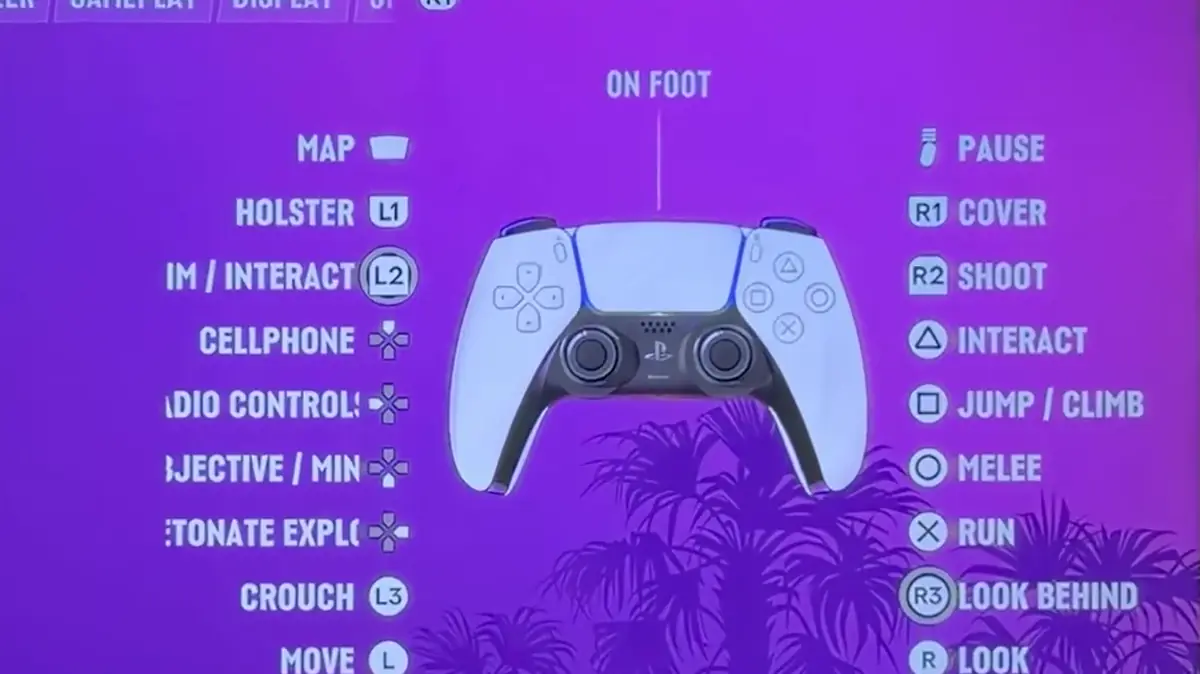
Everything else on foot is identical in both schemes: R2 shoots, L2 aims, R1 takes cover, L1 holsters, Triangle interacts and R3 looks behind.
What about Left-handed?
The third scheme flips the controller: you move with the right stick and look with the left. Shoot moves to L2, aim to R2 and sprint to R3, while the face buttons match Default. kevinsmak showed that one too.
Preview before you commit
The same screen lets you check the full button map for each situation before you confirm. kevinsmak counted nine categories, including on foot, aiming, vehicles, swimming and parachute. Checkmark Academy opened the aiming one to check: R2 shoots, L2 aims.
Classic or Default?
kevinsmak’s take: if you have years of GTA 5 in your hands, Classic will feel like home. The catch is that on Classic your right thumb handles sprinting, and that’s the same thumb that moves the camera, so it leaves the camera while you run. Default keeps sprint on the left stick and frees your right thumb for the camera.
If you stick with Default but get tired of clicking the stick, there’s a middle ground: in the Gameplay tab, set Movement Speed to Run. Your character then runs whenever the left stick is pushed all the way.
While you’re in there: the HUD
GamesRadar+ suggests checking the HUD settings in the same menu. With the default Dynamic HUD, the minimap, your bank balance and the health, stamina and focus bars only show up when you press down on the D-pad. Each one can be toggled on or off in Settings.
The rest of the options worth changing are in the best GTA 6 settings, and the controls the game never explains are in GTA 6 hidden features. New to the game? Start with the GTA 6 beginner tips.